
Millions of Android phones come with a hidden gem: Extreme Battery Saver.
It’s not just a regular power-saving mode—it’s your phone’s emergency fuel tank, ready to kick in when you’re running low.
Surprisingly, many users don’t even know it exists.
But when activated, it shuts down unnecessary background tasks and stretches every last bit of battery—so your phone keeps going when it matters most.
Think of it as a digital lifeline, quietly waiting in your settings.
Next time your battery hits 10%, don’t panic—just flip the switch and stay powered up longer than you thought possible.

Extreme Battery Saver is Android’s hidden superpower for battery life.
It goes beyond the standard saver mode by pausing most apps, slowing background activity, and turning off non-essential features—while still keeping your Phone, Messages, and Clock active.
According to Google, this mode can help your phone last up to 72 hours, compared to the typical 24.
In one real-life case, a Pixel owner used it while searching for a lost dog in the woods. The verdict?
“My Pixel was a trouper—it just kept going.”
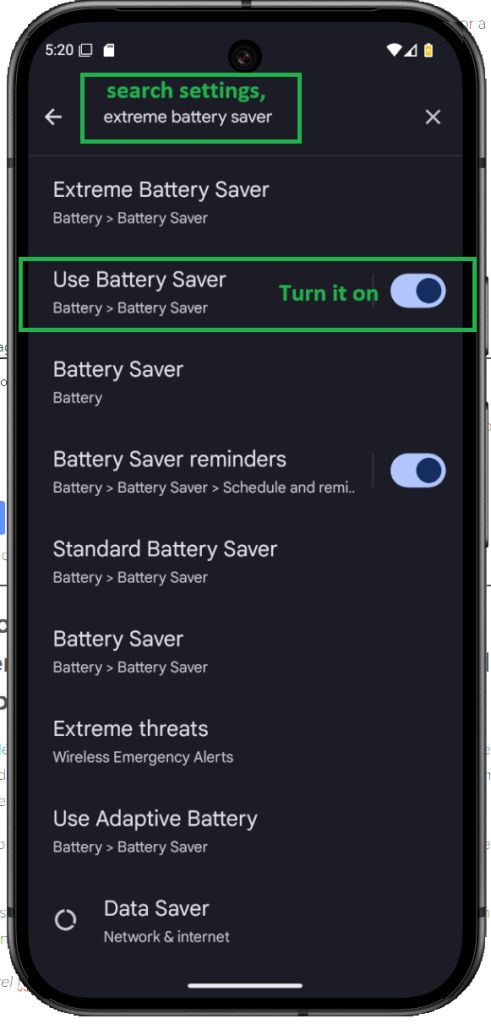
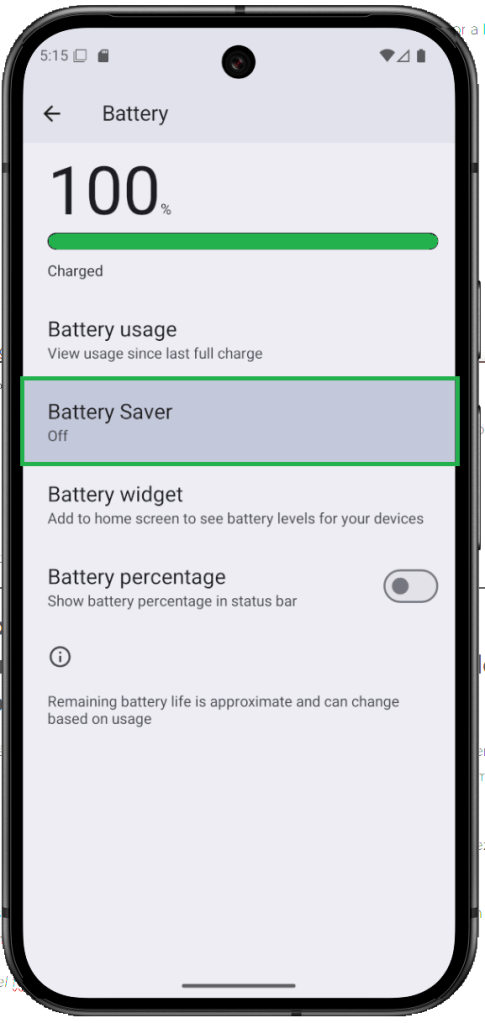
Go to Settings.
In the Settings screen, tap on Search settings.
Type “Use Battery Saver” into the search bar.
Then, switch “Use Battery Saver” from Off to On.
This will help extend your battery life.
Official Google Pixel Battery Tips to Maximize Life
How to Extend Battery Life on Google Pixel – Official Guide
Want your Pixel battery to go the distance? Google’s got your back—but let’s be real, it’s not rocket science. Just a few smart habits, and your phone stops gasping for juice halfway through the day.
First up? Let it breathe.
Don’t force-close everything like you’re swatting flies—your Pixel already knows how to quietly shut down apps you’re not using. Trust it. Give it space, and it’ll do the work.
Second, keep things fresh.
Outdated apps are like old cars—they leak energy. Updates aren’t just for bug fixes; they often come with battery optimizations that help your phone run smoother and last longer. Hit that update button when it shows up—you’re doing your battery a favor.
Third, dial down the brightness.
If your screen looks like a flashlight, it’s time to chill. Not only does lower brightness save power, but your eyes will thank you. Better yet? Switch to Dark theme. Black backgrounds = less power usage + less eye strain. Win-win.
Lastly, know your villains.
Video calls and mobile games might be fun, but they’re absolute battery bandits. If you’re not using an app, close it. Don’t let those sneaky processes hang around and suck the life out of your charge.
So yeah—keep it simple, stay updated, dim that screen, and outsmart the power hogs. Your Pixel’s battery will last longer, and honestly? You’ll feel like a phone pro.
❓ Does Extreme Battery Saver turn off Wi-Fi or mobile data?
Nope, it doesn’t shut them off completely. You’ll still have access to Wi-Fi and mobile data—but here’s the thing: your phone cuts back on background activity. That means apps won’t be refreshing every five seconds. You stay online, just without all the extra noise.
❓ Can I choose which apps keep running?
You sure can. When you switch on Extreme Battery Saver, your Pixel gives you the option to select a few essential apps—like Maps or WhatsApp—that you still want running. Everything else? It politely steps aside to save power.
❓ Will I still receive calls and texts?
Yes, 100%. Even with the battery saver mode cranked up, your phone won’t block the basics. Calls, text messages, alarms—they’re all still active, so you won’t miss anything important.

 GearFlow Lab
Leave a comment