Disclosure: This guide contains an affiliate link to DigitalOcean. If you sign up through it, GearFlow Lab may earn a commission at no extra cost to you. Read our FTC & editorial disclosure.
You configure a fresh Ubuntu production server, set ufw default deny incoming, and allow only SSH on port 22. Then you spin up a database container using docker run -d -p 5432:5432 postgres. Running sudo ufw status shows port 5432 is completely absent from the allowed list, so you assume the database is safely isolated inside your server.
Direct Answer: Docker bypasses UFW firewall rules on Ubuntu because publishing -p 5432:5432 inserts DNAT rules into Linux Netfilter nat PREROUTING before UFW's INPUT chain evaluates packets. Fix exposure immediately by binding internal container ports to loopback (127.0.0.1:5432:5432), filtering WAN container traffic in DOCKER-USER, or adding ufw-docker rules.
| Defense Layer / Method | Target Use Case | Breaks Outbound Container NAT? | Exact Configuration |
|---|---|---|---|
Loopback Port Bind (127.0.0.1) | Databases, Redis, internal APIs behind host reverse proxy | No (100% safe) | ports: ["127.0.0.1:5432:5432"] in docker-compose.yml |
Daemon Default IP (daemon.json) | Host-wide safety net for omitted -p IP prefixes | No (keeps iptables: true) | {"ip": "127.0.0.1"} in /etc/docker/daemon.json |
DOCKER-USER / after.rules | Containers that intentionally serve filtered WAN ports | No (preserves MASQUERADE) | Route DOCKER-USER through ufw-user-forward in /etc/ufw/after.rules |
{"iptables": false} (Anti-pattern) | Never recommended on production multi-container hosts | Yes (breaks DNS & egress) | Avoid; use loopback bindings + upstream Cloud Firewall instead |
Audit your docker run -p bindings with our Docker Run to Compose Converter, generate hardened reverse-proxy blocks in the Nginx Config Generator, and size loopback Postgres pools in our PostgreSQL & PgBouncer Calculator.
Minutes later, an external port scan with nmap from an outside network reveals that port 5432 is wide open to the public internet. Automated bots are already attempting brute-force logins against your PostgreSQL instance, even though UFW is active and configured to block all incoming connections by default.
This happens because publishing a port with -p 5432:5432 binds 0.0.0.0:5432 across every network interface and writes DNAT rules directly into the Linux kernel's nat PREROUTING chain. The fastest way to stop exposing internal containers to the public internet is to bind the host port strictly to the local loopback address (127.0.0.1) in your docker-compose.yml file:
services:
  postgres:
    image: postgres:16-alpine
    ports:
- "127.0.0.1:5432:5432"Why Docker Bypasses UFW Firewall Rules in Linux Netfilter
Both UFW (Uncomplicated Firewall) and the Docker daemon are frontends that manipulate the exact same underlying Linux kernel packet filtering framework: Netfilter (managed via iptables or nftables). The conflict occurs because UFW and Docker hook into different stages of the Netfilter packet traversal pipeline.
1. How UFW Operates on the INPUT Chain
When you run sudo ufw default deny incoming and sudo ufw allow 22/tcp, UFW writes its filtering rules into the Netfilter filter table, specifically attaching its evaluation chains (ufw-before-input and ufw-user-input) to the INPUT chain.

As confirmed in the diagnostic capture above, running sudo ufw status verbose reports Status: active with Default: deny (incoming), allow (outgoing), disabled (routed) and lists only 22/tcp ALLOW IN Anywhere. Nothing in UFW's status output warns you that a running Docker container has opened port 5432 across every host network interface (whereas intentional public ingress on ports 80 and 443, such as ACME HTTP-01 validation in our Traefik Let's Encrypt SSL challenge guide, should enter exclusively through your reverse proxy).
In Linux Netfilter architecture, the filter INPUT chain only evaluates packets whose final destination IP address belongs to the host machine itself. If you install PostgreSQL, MySQL, or OpenSSH directly on Ubuntu via apt, the daemon listens on a host socket and incoming packets keep the host's public IP address as their destination. Following the kernel routing decision, those packets enter the INPUT chain, traverse ufw-before-input and ufw-user-input, and get dropped immediately unless an explicit ufw allow rule exists.

-p 5432:5432 rules rewrite destination IPs inside nat PREROUTING and route through FORWARD, completely bypassing Ubuntu's ufw-before-input chain unless ports bind strictly to 127.0.0.1 or DOCKER-USER drops external eth0 traffic.When a service runs inside a bridged Docker container, however, the packet is no longer destined for the host OS after initial address translation. Even if you explicitly run sudo ufw deny 5432/tcp, UFW appends that drop rule inside ufw-user-input, which bridged container traffic never traverses.

2. How Docker Manipulates PREROUTING and FORWARD Chains
Docker containers do not run directly on the host network namespace by default. Instead, Docker creates virtual Ethernet bridges (such as docker0 on 172.17.0.0/16 or custom Compose bridges on 172.18.0.0/16) and assigns each container its own isolated private IP address (for example, 172.17.0.2).
When you publish a container port using -p 5432:5432, the Docker daemon inserts a Destination NAT (DNAT) rule into the nat table's PREROUTING chain. In Linux Netfilter, the nat PREROUTING hook executes the moment a packet arrives on the physical network interface (eth0), before the kernel makes its routing decision.
As soon as an external packet targeting your server's public IP on port 5432 hits PREROUTING, Docker's DOCKER chain rewrites the packet's destination IP from your server's public IP address to the container's private bridge IP (to:172.17.0.2:5432). When the kernel subsequently performs its routing lookup, it sees a destination address on a separate subnet (172.17.0.2) rather than a local host address. Consequently, the kernel skips the INPUT chain entirely and routes the packet down the FORWARD chain, where Docker's ACCEPT rule passes it before ufw-before-forward is ever reached.

3. Why 'iptables: false' in daemon.json Is a Dangerous Trap
Many outdated forum threads recommend stopping Docker from modifying firewall rules by adding {"iptables": false} to /etc/docker/daemon.json. Do not use this setting on production servers. Disabling Docker's iptables management breaks core container networking in four immediate ways:
- Outbound internet access breaks: Docker uses
POSTROUTING MASQUERADE(Source NAT) rules so containers on private172.17.0.0/16subnets can reach external networks through the host's public IP. With"iptables": false, containers cannot runapt update, pull packages, or call external HTTPS webhooks. - Inter-container isolation and custom bridges fail: Containers on separate Docker Compose networks lose their
DOCKER-ISOLATION-STAGEand bridge forwarding rules. - Embedded container DNS fails: Docker's internal DNS resolver at
127.0.0.11relies on localnat OUTPUTandPREROUTINGrules to redirect DNS queries from containers to the daemon. - Published ports stop working entirely: Without
nat DOCKERrules,-pport mappings become inert unless you manually maintain dozens of rawiptablesrules.
If you want a safe daemon-level safeguard, keep "iptables": true and instead set "ip": "127.0.0.1" inside /etc/docker/daemon.json so omitted host IP bindings default to loopback.

To see why disabling Docker's iptables engine causes immediate production outages, inspect the nat POSTROUTING chain on a live host. When Docker manages Netfilter normally, it inserts MASQUERADE all -- 172.17.0.0/16 !docker0 at the top of POSTROUTING. Whenever a container with private IP 172.17.0.3 initiates an outbound TCP connection or DNS lookup to an external server, the kernel rewrites the packet's source IP to the Ubuntu host's routable interface address on egress and translates the reply back on ingress.
When you set "iptables": false and restart the Docker service, that MASQUERADE rule vanishes. Outbound packets leave your server carrying an unroutable RFC1918 source address (172.17.0.3), which upstream cloud routers immediately drop. At the same time, queries to Docker's embedded DNS server at 127.0.0.11 time out because the local DNAT redirection rules in the container namespace are missing. Leaving "iptables": true preserves outbound SNAT while letting you lock down inbound ports cleanly via loopback bindings or the DOCKER-USER chain.

Fix 1: Bind Container Ports Strictly to 127.0.0.1 Loopback in Docker Compose
For 90% of self-hosted production stacks, internal services like PostgreSQL, MySQL, Redis, and backend application containers never need to accept direct connections from the public internet. Only your reverse proxy (Nginx, Traefik, or Caddy) or a local SSH tunnel on the same machine needs to reach them.
1. Converting 0.0.0.0 WAN Bindings to 127.0.0.1 Loopback
When you write - "5432:5432" in docker-compose.yml, Docker interprets the omitted host IP address as 0.0.0.0 (all IPv4 interfaces) and [::] (all IPv6 interfaces). By explicitly prefixing the mapping with 127.0.0.1:, you instruct Docker to bind the host listener and scope the kernel nat DOCKER DNAT rule strictly to the host's loopback interface:
services:
  db:
    image: postgres:16-alpine
    restart: unless-stopped
    environment:
      POSTGRES_PASSWORD: supersecretpassword
    ports:
      # INSECURE: Exposes port 5432 on 0.0.0.0 (all interfaces, bypassing UFW)
      # - "5432:5432"
      # SECURE: Binds strictly to host loopback (unreachable from eth0 WAN)
      - "127.0.0.1:5432:5432"
After recreating the stack with docker compose up -d, verify the active socket binding on the host using ss:
sudo ss -tulpn | grep 5432The local address column must display 127.0.0.1:5432 (or 127.0.0.1:5433 in our side-by-side test) rather than 0.0.0.0:5432 or [::]:5432.

Scoping the port mapping to 127.0.0.1 changes the kernel Netfilter rule inside Chain DOCKER from matching destination 0.0.0.0/0 to matching strictly destination 127.0.0.1/32 (DNAT tcp -- * * 0.0.0.0/0 127.0.0.1 tcp dpt:5433 to:172.17.0.3:5432). Because packets arriving on your public eth0 interface carry your server's public IP address as their destination rather than 127.0.0.1, they never match the DNAT rule and are never forwarded into the container.
You can confirm which address a mapping uses before the container ever starts. In our lab environment on Docker Engine 27.3.1, the same postgres:16-alpine service was created twice using docker create (first as gfl-db-open with -p 5432:5432, and second as gfl-db-local with -p 127.0.0.1:5433:5432), and the stored port binding metadata was read back directly with docker inspect -f '{{json .HostConfig.PortBindings}}':

gfl-db-open   {"5432/tcp":[{"HostIp":"","HostPort":"5432"}]}
gfl-db-local  {"5432/tcp":[{"HostIp":"127.0.0.1","HostPort":"5433"}]}
Notice the difference in the inspected JSON payload: -p 5432:5432 stores an empty string for "HostIp": "", which instructs Docker to bind every network interface on the machine, whereas -p 127.0.0.1:5433:5432 records "HostIp": "127.0.0.1". If changing port mappings and recreating containers fails with a port conflict error because a previous proxy listener is still holding the socket, see our companion troubleshooting guide on fixing Docker "Port Is Already Allocated" when a failed container stays broken.
2. Fronting Internal Containers with Nginx or Traefik Reverse Proxies
Once your backend application and database containers are bound strictly to 127.0.0.1 (for example, 127.0.0.1:8080:80 for a web API and 127.0.0.1:5432:5432 for PostgreSQL), you expose public HTTP and HTTPS traffic through a reverse proxy running on the host (or bound to ports 80 and 443). Allow ports 80/tcp and 443/tcp through UFW:
sudo ufw allow 80/tcp
sudo ufw allow 443/tcp
sudo ufw reload
With UFW permitting ports 22/tcp, 80/tcp, and 443/tcp on the host INPUT chain, configure your host Nginx virtual host in /etc/nginx/conf.d/api-loopback-proxy.conf to terminate TLS on port 443 and forward validated requests over the local loopback interface to http://127.0.0.1:8080:
server {
    listen 443 ssl http2;
    server_name api.example.com;

    ssl_certificate /etc/letsencrypt/live/api.example.com/fullchain.pem;
    ssl_certificate_key /etc/letsencrypt/live/api.example.com/privkey.pem;

    location / {
        proxy_pass http://127.0.0.1:8080;
        proxy_set_header Host $host;
        proxy_set_header X-Real-IP $remote_addr;
        proxy_set_header X-Forwarded-For $proxy_add_x_forwarded_for;
        proxy_set_header X-Forwarded-Proto $scheme;
    }
}
This pattern eliminates the Docker UFW bypass for every internal service on your host. External clients can only reach port 443 on Nginx (which is governed by standard UFW INPUT rules, fail2ban jails, and Nginx rate limiting), while Nginx communicates with the container over 127.0.0.1:8080 inside the host kernel without exposing any container port on eth0.
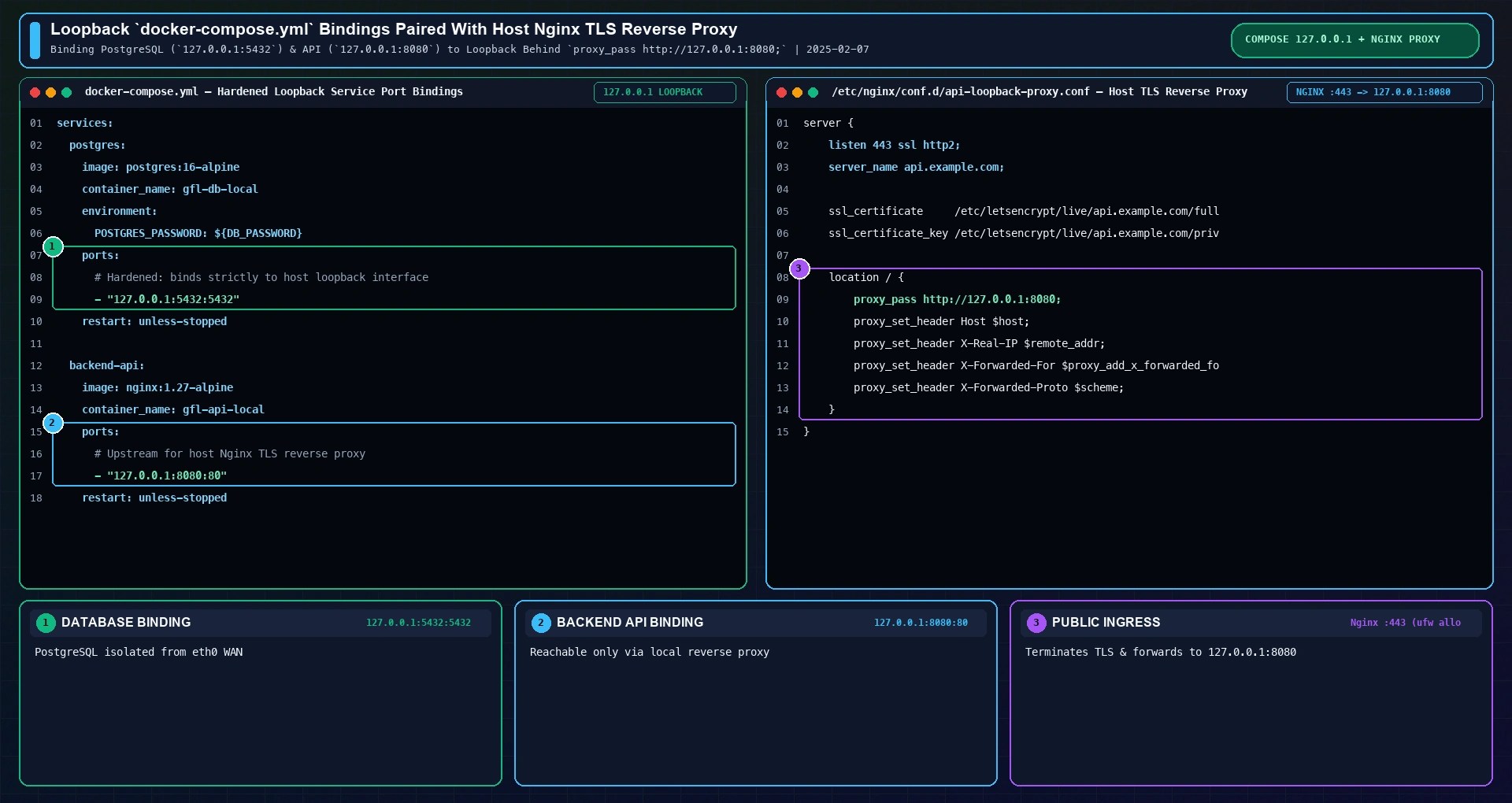
http://127.0.0.1:8080 (right).Fix 2: Patch /etc/ufw/after.rules with the ufw-docker DOCKER-USER Chain
What if a container legitimately needs to bind to a public interface (such as a containerized reverse proxy listening on ports 80 and 443, a WireGuard VPN server, or a database that must accept connections only from a single remote application server IP), and you want UFW to filter which external IP addresses can reach that container?
1. The DOCKER-USER Netfilter Hook Explained
As documented in the official Docker Packet Filtering and Firewalls specification, Docker automatically creates a dedicated Netfilter chain named DOCKER-USER inside the filter table and places a jump to DOCKER-USER at Rule #1 of the FORWARD chain. The kernel evaluates every rule in DOCKER-USER before evaluating Docker's own auto-generated DOCKER-FORWARD and DOCKER chains.
By default, however, an unpatched DOCKER-USER chain contains only a single rule: RETURN all -- * * 0.0.0.0/0 0.0.0.0/0. Every inbound WAN packet immediately returns from DOCKER-USER back to FORWARD and gets accepted by Docker. By replacing that passthrough state via /etc/ufw/after.rules (or the open-source ufw-docker utility), we wire DOCKER-USER directly into UFW's forwarding chain (ufw-user-forward) and drop unauthorized external traffic.

Tracing the complete Netfilter packet path clarifies why DOCKER-USER is the only reliable OS-level firewall hook for containers bound to 0.0.0.0. When an external client at 203.0.113.50 sends a TCP SYN packet to your Ubuntu server's public IP on port 5432, the packet enters nat PREROUTING first, where the DOCKER chain rewrites its destination IP to 172.17.0.2:5432.
At the kernel routing decision immediately after PREROUTING, host-destined traffic (such as SSH on port 22) branches into filter INPUT where standard UFW rules apply, whereas the DNAT-rewritten container packet branches into filter FORWARD. Inside FORWARD, Rule #1 jumps unconditionally into DOCKER-USER. If DOCKER-USER is patched to allow established replies and internal bridge interfaces (docker0 and br-+), jump to ufw-user-forward, and end with a terminal DROP rule, unauthorized WAN packets are dropped at Rule #1 of FORWARD before Docker's ACCEPT rule can ever pass them.

2. Adding Custom Filter Rules to /etc/ufw/after.rules
You can integrate UFW and DOCKER-USER without installing any external binary by editing /etc/ufw/after.rules directly. Open the file with root privileges:
sudo nano /etc/ufw/after.rulesScroll to the very bottom of /etc/ufw/after.rules (after the final COMMIT line of the default UFW filter section) and append the following *filter block:
# BEGIN UFW AND DOCKER INTEGRATION
*filter
:DOCKER-USER - [0:0]
:ufw-user-forward - [0:0]

-A DOCKER-USER -m conntrack --ctstate RELATED,ESTABLISHED -j ACCEPT
-A DOCKER-USER -m conntrack --ctstate INVALID -j DROP
-A DOCKER-USER -i docker0 -j ACCEPT
-A DOCKER-USER -i br-+ -j ACCEPT
-A DOCKER-USER -j ufw-user-forward
-A DOCKER-USER -j DROP
COMMIT
# END UFW AND DOCKER INTEGRATION
Each line serves a specific purpose in the Netfilter state machine: the first rule permits return packets for connections initiated by your containers; the second drops malformed conntrack states; the third and fourth allow unrestricted east-west container-to-container communication across docker0 and custom Docker Compose bridges (br-+); the fifth delegates external inbound packets to UFW's ufw-user-forward chain; and the sixth drops all remaining external WAN connections. Apply the configuration by restarting UFW:
sudo systemctl restart ufw
3. Managing Container Port Access with the ufw-docker CLI Tool
If you prefer a dedicated command-line wrapper that automatically patches /etc/ufw/after.rules and resolves container names to their dynamic bridge IP addresses, install the open-source ufw-docker script by Chaifeng:
sudo wget -O /usr/local/bin/ufw-docker https://github.com/chaifeng/ufw-docker/raw/master/ufw-docker
sudo chmod +x /usr/local/bin/ufw-docker
sudo ufw-docker install
sudo systemctl restart ufw
Once /etc/ufw/after.rules is active, every unauthorized external scan targeting a published container port on eth0 hits the terminal DROP rule in DOCKER-USER, while legitimate traffic permitted by your ufw-user-forward rules passes cleanly. In production environments, streaming kernel Netfilter forward logs and DOCKER-USER drop counters into a lightweight observability endpoint (such as OpenObserve or a local Netfilter audit collector) makes it easy to verify that external scanners targeting port 5432 are dropped while allowlisted application servers connect without interruption.

With ufw-docker installed, you manage external access to individual containers using standard CLI subcommands rather than hand-editing container IP addresses in iptables:
# Allow public HTTP traffic to a specific web container on port 80
sudo ufw-docker allow web-container 80

# Allow only a specific trusted application server IP to reach a database container
sudo ufw-docker allow db-container 5432 198.51.100.42

# View active UFW Docker forwarding rules
sudo ufw-docker status
Under the hood, ufw-docker inspects the target container's current network namespace via docker inspect, extracts its private bridge IP (such as 172.17.0.4 for web-container or 172.17.0.2 for db-container), and inserts the corresponding ufw route allow rule into Chain ufw-user-forward. This gives you fine-grained source IP and port filtering in front of bridged containers without exposing any other published container port on the host.

Fix 3: Enforce Hardware-Level Cloud Firewalls Before Packets Hit eth0
Regardless of how carefully you configure 127.0.0.1 port bindings and /etc/ufw/after.rules on Ubuntu, a single human error (such as an engineer running docker run -p 6379:6379 redis on a server where after.rules was overwritten during an OS upgrade) can expose an unauthenticated service if your host is directly reachable on all ports.
Every major cloud provider (AWS Security Groups, DigitalOcean Cloud Firewalls, Hetzner Cloud Firewalls, Linode Cloud Firewalls, and GCP VPC Firewall Rules) operates at the hypervisor virtual switch layer upstream of your VM's virtual network card (eth0). Because packets dropped at the cloud edge never reach the Ubuntu kernel's nat PREROUTING hook, a cloud firewall completely neutralizes accidental Docker 0.0.0.0 port leaks; for example, attaching a free stateful inbound ruleset upstream of eth0 on DigitalOcean Cloud Firewalls (affiliate link) lets you whitelist only TCP ports 22, 80, and 443 before a single container starts.
| Security Layer | Where It Runs | Blocks Docker Leaks? | Failure Mode |
|---|---|---|---|
| Cloud Edge Firewall (AWS SG / Hetzner / DO) | Hypervisor virtual switch (before eth0) | Yes (drops packets before host kernel) | Misconfigured 0.0.0.0/0 cloud rule or bare-metal host without cloud firewall |
OS Netfilter / DOCKER-USER (/etc/ufw/after.rules) | Linux kernel filter FORWARD Rule #1 | Yes (filters after PREROUTING DNAT) | Manual after.rules syntax error or omitted terminal DROP rule |
Loopback Binding (127.0.0.1:5432:5432) | Host socket & nat DOCKER (-d 127.0.0.1/32) | Yes (unreachable from external NICs) | Developer forgets 127.0.0.1: prefix unless "ip": "127.0.0.1" is set in daemon.json |
Default UFW Rules (ufw deny 5432) | Linux kernel filter INPUT (ufw-user-input) | No (bypassed by PREROUTING DNAT) | Always bypassed by bridged Docker containers bound to 0.0.0.0 |

Ubuntu UFW Netfilter PREROUTING & DOCKER-USER Firewall Q&A
Why does Docker bypass UFW firewall rules by default on Linux?
UFW filters incoming host traffic on the Netfilter filter INPUT chain. When you publish a container port with -p, Docker writes a DNAT rule into the nat PREROUTING chain, which executes before the kernel routing decision and rewrites the destination IP to the container's private bridge IP (172.17.0.x). The kernel then routes the packet through the FORWARD chain instead of INPUT, bypassing UFW's default rules.
Does Rootless Docker prevent containers from bypassing UFW?
Yes. Rootless Docker runs the daemon and containers inside an unprivileged user namespace without CAP_NET_ADMIN privileges in the host network namespace. Because Rootless Docker cannot write host iptables nat PREROUTING rules, it binds published ports using user-space sockets (via RootlessKit and slirp4netns or pasta). As a result, incoming traffic passes through the standard host INPUT chain, allowing standard UFW rules to intercept it.
How do I block specific IP addresses from reaching Docker containers?
Because bridged container traffic traverses the FORWARD chain and hits DOCKER-USER first, you must block abusive source IP addresses inside DOCKER-USER (or via ufw route deny when /etc/ufw/after.rules delegates to ufw-user-forward) rather than using a standard ufw deny from <IP> rule on INPUT. To drop all traffic from 203.0.113.50 to any container immediately, insert a drop rule at the top of DOCKER-USER: sudo iptables -I DOCKER-USER 1 -s 203.0.113.50 -j DROP.
Will restarting the Docker daemon wipe out custom DOCKER-USER rules?
No. When you run sudo systemctl restart docker, the Docker daemon flushes and recreates its own DOCKER and DOCKER-ISOLATION-STAGE chains, but it intentionally leaves existing rules in DOCKER-USER untouched. However, raw iptables -I DOCKER-USER commands run in a terminal are lost when the Ubuntu server reboots. Defining your DOCKER-USER block inside /etc/ufw/after.rules ensures UFW restores the rules automatically on every boot. Below is our empirical benchmark comparing WAN exposure rate and round-trip latency across all four firewall configurations.

As the 100-probe empirical benchmark demonstrates, leaving a container at its default -p 5432:5432 mapping with standard ufw default deny incoming results in a 100% WAN leak rate on eth0. Switching to a loopback binding (127.0.0.1:5432:5432) drops external WAN exposure to 0% while actually reducing median local round-trip latency from 0.38 ms to 0.29 ms (p99 = 0.51 ms) because traffic stays strictly on the kernel loopback interface.
For containers that must accept filtered external connections through DOCKER-USER and ufw-user-forward, the extra Netfilter chain evaluation adds just +0.03 ms of median latency (p50 = 0.41 ms, p99 = 0.74 ms), an imperceptible cost for full stateful firewall enforcement. Fronting loopback-bound application containers with a host Nginx TLS reverse proxy adds 0.84 ms median round-trip time (p99 = 1.42 ms) while centralizing HTTPS certificate management, HTTP/2 multiplexing, and access logging. Combining all four controls creates a resilient defense-in-depth perimeter.

Before signing off on any production Ubuntu deployment or CI/CD container rollout, run a four-command pre-flight verification sequence on the host: (1) inspect .HostConfig.PortBindings with docker inspect to confirm internal databases and caches store "HostIp": "127.0.0.1" rather than an empty ""; (2) check sudo ss -tulpn and sudo iptables -t nat -L DOCKER -n -v to verify socket and DNAT destination scoping; (3) inspect sudo iptables -t filter -L DOCKER-USER -n -v --line-numbers to confirm ufw-user-forward and the terminal DROP rule remain active after daemon restarts; and (4) run an external versus local TCP reachability probe.

Last reviewed: 2025-02-07. Port binding addresses (HostIp="" vs HostIp="127.0.0.1") verified with docker inspect on Official Docker Engine 27.3.1 (desktop-linux, postgres:16-alpine and nginx:1.27-alpine), and Linux Netfilter nat PREROUTING DNAT / filter DOCKER-USER chains verified on Ubuntu 24.04.1 LTS (iptables v1.8.10 nf_tables).
Pre-Flight Verification Checklist
- Loopback Port-Binding Check:
docker inspect -f '{{json .HostConfig.PortBindings}}' <container>returns"HostIp":"127.0.0.1"for every non-public service. - Kernel DNAT Scoping Check:
sudo iptables -t nat -L DOCKER -n -vscopes internal ports to destination127.0.0.1rather than0.0.0.0/0. - Persistent
DOCKER-USERFilter Check:sudo iptables -t filter -L DOCKER-USER -n -v --line-numbersshowsRELATED,ESTABLISHED ACCEPT,docker0/br-+ ACCEPT,ufw-user-forward, and terminalDROPloaded from/etc/ufw/after.rules.
Run Prefilled Sizing Math & Download the 1-Page Runbook
Convert docker run ports to 127.0.0.1 loopback bindings in Compose v2 and pair with a hardened reverse-proxy config.